November 9th, 2026
Cash Application: When Remittances Arrive Seven Different Ways
By Dave Ewing. Last updated on November 9th, 2026
Key takeaways
- Every remittance channel breaks differently. Email and portal layouts vary by customer. Wires carry almost no detail, and lockbox keying costs money and drops data.
- Lockbox and CTX aside, cash and remittance tend to arrive apart. Every payment has to be matched to its remittance and then to the open invoices.
- An automated setup should send every channel into a single matching engine. Whatever it can’t match goes to a work queue, and matched cash posts straight to the ERP.
- Track auto-match rate and remittance lag for each channel separately. A healthy overall match rate can hide one channel that is still handled almost entirely by hand.
A customer pays 214 invoices with one ACH credit. The remittance detail shows up two days later as a PDF in a shared inbox, minus three short-paid lines and a deduction code nobody recognizes. On the same morning, another customer’s wire arrives with nothing but a PO number. A third posts its remittance to a supplier portal that someone on your team has to log into.
That is cash application at volume. On its own, matching any single payment isn’t hard. What makes it hard is that every channel delivers payment and remittance differently, and often separately, so your team has to stitch them back together thousands of times a month before they can post the cash.
With that in mind, this post walks through what each channel actually gives you, then why the separation of payment from remittance is the real problem, and finally what a cash application process needs to do to keep up.
Each channel breaks in a different way. The table shows, for each one, what typically comes in, where the remittance detail sits, and the usual failure points.
Seven channels, seven different problems
Each channel fails in its own way. The table below sums up what usually arrives, where the remittance detail lives, and what tends to go wrong.
| Channel | What Arrives | Where the remittance lives | What goes wrong |
| PDFs, spreadsheets, scanned images, or text in the email body | Attachments in a shared AR inbox | Every customer uses a different layout; one email can cover several payments, or one payment can be split across several emails | |
| Customer Portals | Remittance advices posted on the payer’s AP platform | Behind a login on each customer’s portal | Someone has to log in, download and re-key; detail often appears days after the cash |
| EDI820 | Structured payment order and remittance advice | A separate EDI transaction, usually through a VAN or the payer’s EDI provider | Clean in theory, but payers vary in how they use the segments, and the 820 can arrive before or after the money |
| Bank lockbox | Check images, stub images and a transmission file from the bank | The bank’s data file, keyed from the stubs | Banks charge per keyed line; fields are truncated or mis-keyed; invoice detail on non-standard stubs is often skipped |
| ACH | A credit on the bank statement | CCD+ carries one 80-character addenda record; CTX can carry a full 820 | Most payers send CCD with no addenda, so the remittance comes separately by email or portal |
| Wire | A credit on the bank statement | A short free-text field | Often just a customer name or a PO number; one wire can settle dozens of invoices |
| Check (in-house) | Paper checks and stubs received at the office | The stub, or a letter in the envelope | Manual scanning and keying; handwritten notes; checks without stubs |
Wires are slowly improving. Fedwire’s 2025 move to ISO 20022 messaging leaves room for structured remittance data, but few payers fill it in yet. For now, plan as if most wires will arrive with very little detail.
The real problem: cash and remittance travel separately
Only lockbox and CTX reliably deliver the payment and its detail together. Everywhere else, the money lands on the bank statement and the explanation of that money comes through some other door, at some other time. Cashbook calls this decoupled remittance, and manual payment matching can take up to half of all cash application effort. So high-volume cash application is really a three-way match:
- The payment: an amount, a date and a payer reference from the bank statement or lockbox file.
- The remittance: which invoices the payer says it is paying, from email, portal, EDI or the stub.
- The open items: what the ERP says the customer owes.
Any one of these can be missing or wrong. A remittance can reference an invoice number in a format your ERP doesn’t use. The payment can be short because of a deduction the remittance explains in a code. The bank can show the payer under a parent company name that matches no customer record. Each mismatch lands in someone’s queue.
Volume makes it worse. A team that applies a few hundred payments a month can live with a spreadsheet and a good memory. Once you’re at thousands of payments across several ERPs and bank accounts, unmatched items pile up faster than people can clear them, and before long, unapplied cash starts to distort the AR aging that collections relies on.
What multi-channel automation has to do
Good automation treats every channel as an input to one matching engine, so a payment is matched the same way whether its remittance came by email or EDI.
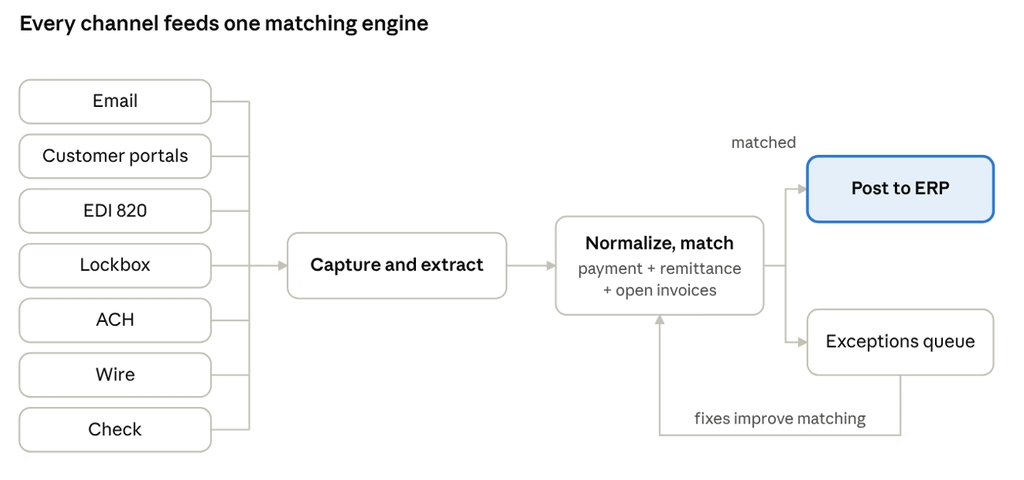
Capture from every door. Bank statements and lockbox files arrive on a schedule. The system pulls email remittances from the AR inbox automatically. It collects portal remittances instead of making someone re-key them. It processes EDI 820s the moment they arrive. Any channel that still needs someone to download a file manually will always trail behind.
Identify and extract. Remittances come in every shape: a PDF from one customer, a spreadsheet from the next, with nothing in common between them. As each one arrives, the system works out what kind of document it is and how the sender structured it, then extracts the payer, amounts, invoice numbers and deduction codes – without a custom template for every customer.
Normalize. Invoice numbers lose their leading zeros. Customers quote their own PO number instead of your invoice number. Dates turn up in several formats. All of it has to be converted into one consistent format before matching begins.
Match payment, remittance and open items. Exact matches are easy. The value is in the rest: one payment against many invoices, many payments against one invoice, short pays, overpays, a payer that is a subsidiary of the account holder, and payments with no remittance at all, where the engine has to find the combination of open invoices that adds up to the amount. Rules handle the predictable cases. Learning from how your team resolves exceptions handles the long tail.
Route exceptions, don’t hide them. Whatever the engine can’t match should land in a work queue with the payment, the remittance and the likely candidates side by side. Short pays should become deductions with a reason code, ready for follow-up rather than written off.
Post back to the ERP. Matched cash should update the ledger without anyone re-keying it. In multi-entity groups that often means more than one ERP. A division on JD Edwards and another on NetSuite still need the same process.
How to tell whether it’s working
Track a few numbers per channel, not just overall. A strong overall match rate can hide one channel where nearly everything is manual.
| Metric | What it tells you |
| Auto-match rate by channel | Where automation is carrying the load and where people still are |
| Unapplied cash (amount and age) | How much received cash isn’t yet reflected against customer balances |
| Time from cash receipt to posting | Whether remittance lag, not matching, is the bottleneck |
| Exceptions per analyst per day | Whether the work queue is shrinking as the system learns |
| Lockbox keying cost | What you’re paying the bank to do data entry |
| DSO | The downstream effect: faster posting means collections chases the right balances |
If remittance lag is the bottleneck, better matching won’t fix it. You need to capture portal and email remittances sooner, or ask your largest payers to move to CTX or EDI.
How Cashbook handles it
Cashbook’s cash application module brings bank statements, lockbox files, email remittances, customer portal remittances and deductions into one process. Remittances are auto-matched against open invoices and against the cash on your bank statements, and matched transactions update the general ledger automatically.
A few specifics matter at high volume:
- Document identification recognizes remittance types and layouts as they arrive and extracts them into a standard format (details).
- Lockbox without the keying fees. Cashbook processes lockbox images and data directly, which removes bank lockbox keystroke charges.
- Multi-ERP integration with more than 10 ERPs, so divisions on different systems can share one cash application process.
- Results. Cashbook customers automate up to 95% of cash application and reduce DSO by 5 days.
If your team is still re-keying portal remittances or chasing wires with no detail, book a demo and bring a week of your hardest remittances. We’ll show you how many of them match.
FAQ
What is decoupled remittance?
It’s when a payment and the details of what it pays arrive separately. The cash shows up on the bank statement, while the invoice list comes later by email, portal or EDI. Someone or something has to reunite them before the cash can be applied.
Can a payment be applied if no remittance ever arrives?
Often, yes. The matching engine can look at the payer’s open invoices and find the combination that adds up to the payment amount, using past payment patterns to pick the likeliest one. Anything it can’t resolve goes to the exceptions queue.
Do we need to drop our bank lockbox to automate?
No. Cashbook processes the lockbox images and data file directly, alongside your other channels. That also lets you stop paying the bank to key remittance lines.
What auto-match rate is realistic?
It depends on your payer and channel mix, so measure it per channel. Cashbook customers automate up to 95% of cash application, with wires and payments that arrive without remittance usually the last to reach full automation.
Sources
About Author
Dave Ewing is the Marketing Manager at Cashbook, bringing over 20 years of expertise in marketing and technology to the role. He focuses on sharing valuable insights into cash management, accounts receivable automation, bank reconciliation, and ERP-integrated financial processes. In addition to his marketing efforts, Dave plays a key role in product development, helping to create innovative solutions that empower finance teams to work more efficiently.